

LineageOS is widely celebrated as one of the most reliable and popular custom ROMs for Android, delivering a clean, bloat-free Android experience right out of the box. Originating from the legendary CyanogenMod project, LineageOS extends the lifespan of smartphones long after manufacturers drop official software support, while giving users complete control over their hardware.
Whether you want to revive an older phone, escape heavy manufacturer skins, or run the newest Android version, this updated guide covers the latest LineageOS releases (including version 24, 23, and 22), official download portals, supported device codenames, and essential flashing tips.
Helpful companion guides: How to Install LineageOS on Android, Download & Install ADB and Fastboot on Windows, How to Build LineageOS on Windows 10 & 11, and our walkthrough on unlocking the bootloader and flashing custom ROMs.
LineageOS Version Tracker
LineageOS follows Google’s Android Open Source Project (AOSP) code closely. Below is the breakdown of major LineageOS version releases and their corresponding Android foundations:
| LineageOS Version | Base Android Version | Current Status | Key Highlights |
|---|---|---|---|
| LineageOS 24 | Android 17 | Active / Latest | Canvas native image editor, streaming A/B updater, WebUSB browser flash tools |
| LineageOS 23 | Android 16 | Active / Mainline | Predictive back gestures, expanded QEMU virtualization, updated AOSP base |
| LineageOS 22.1 | Android 15 (QPR1) | Active / Stable | Twelve music player, Camelot PDF viewer, restored dot-subversions |
| LineageOS 21 | Android 14 (QPR1) | Active / Supported | Full Material You suite: Aperture camera, Glimpse gallery, Jelly browser |
What Is New in LineageOS 24
Recent major releases brought substantial refinements to daily usability while maintaining strict performance and battery efficiency standards:
- Canvas Image Editor (LineageOS 24): A native image editor built directly into the system for cropping, white balance adjustment, and quick filters alongside Glimpse gallery.
- Redesigned Streaming Updater (LineageOS 24): Streams A/B partition updates directly to the inactive partition, reducing installation and reboot delays.
- WebUSB Flashing Tools (LineageOS 24): Browser-based installation support for Fastboot, ADB, and Samsung Odin protocols directly from compatible desktop browsers.
Official LineageOS Download Portals
Always fetch LineageOS builds and recovery images directly from official project infrastructure. Avoid third-party mirror portals that repackage archive files or bundle unwanted bloatware:
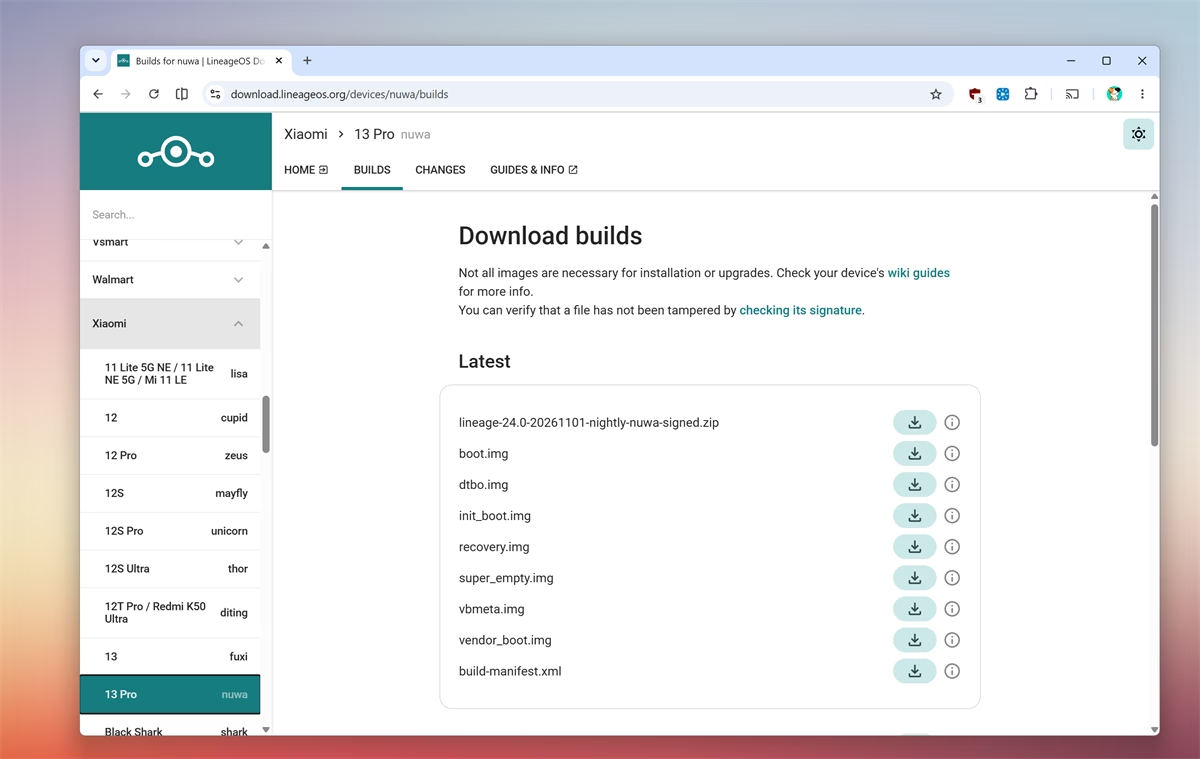
- Official LineageOS Download Portal (download.lineageos.org): The central distribution hub for official signed nightly and weekly builds. Filter by manufacturer and device codename to access verified OS packages, partition images, and SHA256 checksums.
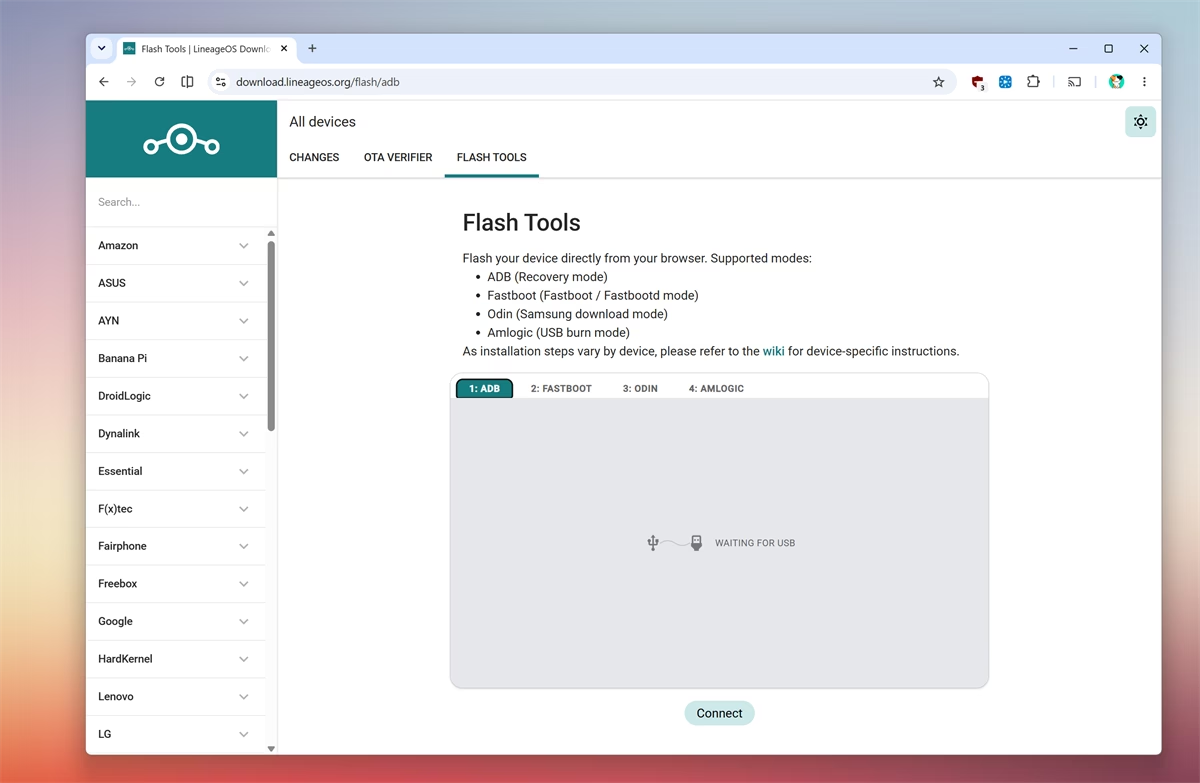
- LineageOS WebUSB Flashing Tool (flash.lineageos.org): LineageOS offers a browser-based flashing tool using WebUSB. From any Chromium browser (Chrome, Edge, Brave), you can flash builds and recovery images directly via ADB sideload, Fastboot, Samsung Odin download protocol, or Amlogic TV box recovery without installing manual command-line toolsets.
- LineageOS Wiki & Device Directory (wiki.lineageos.org): Comprehensive hardware documentation for every supported device. Always read your device wiki page before downloading, as it lists exact partition requirements and necessary firmware prerequisites.
Understanding the Download Files: What Do You Actually Need?
When you open your device page on the official LineageOS download portal, you will see several file types listed under each build date. Here is what each file does and whether you need to download it:
lineage-XX.X-*-nightly-*-signed.zip(Main ROM Package): This is the full operating system archive containing the system, product, and vendor partitions. Everyone needs this file. You sideload it via recovery usingadb sideload filename.zip.recovery.img(Lineage Recovery): Needed for devices with a dedicated recovery partition. You flash this via fastboot (fastboot flash recovery recovery.img) during initial installation.boot.img(Boot Kernel Image): On modern Virtual A/B devices that lack a separate physical recovery partition, Lineage Recovery is stored inside the boot partition. Flashed viafastboot flash boot boot.img.vendor_boot.img(Vendor Boot Image): Common on Android 13, 14, 15, 16, and 17 handsets where OEM recovery ramdisks reside in the vendor boot slot. Flashed viafastboot flash vendor_boot vendor_boot.img.dtbo.imgandvbmeta.img: Device Tree Blob Overlay and Android Verified Boot metadata. Required only on select chipsets (such as certain MediaTek or Tensor models) where partition tables must be patched prior to first boot.
Never guess which partition image to flash. Check your device page on the LineageOS Wiki, as it specifies the exact fastboot command for your model. If Windows fails to communicate with your phone in fastboot mode, follow our guide on setting up ADB and Fastboot drivers on Windows 11 and 10.
Popular Supported Devices (Quick Reference)
LineageOS builds are organized strictly by device codename. Below is a quick-reference table for widely used models:
| Manufacturer | Device Model | Codename | Latest Official Build | Recovery Type |
|---|---|---|---|---|
| Pixel 9 / Pixel 9 Pro / Pro XL | tokay / caiman / komodo | LineageOS 24 | Boot image (boot.img) | |
| Pixel 8 / Pixel 8 Pro | shiba / husky | LineageOS 24 / 23 | Boot image (boot.img) | |
| Pixel 7 / Pixel 7 Pro | panther / cheetah | LineageOS 24 / 23 | Boot image (boot.img) | |
| Pixel 6 / Pixel 6 Pro | oriole / raven | LineageOS 24 / 23 | Boot image (boot.img) | |
| Xiaomi | POCO F6 / Redmi Turbo 3 | peridot | LineageOS 23 / 24 | Vendor Boot (vendor_boot.img) |
| Xiaomi | POCO F5 / Redmi Note 12 Turbo | marble | LineageOS 24 / 23 | Vendor Boot (vendor_boot.img) |
| Xiaomi | POCO F4 / Redmi K40S | munch | LineageOS 24 / 23 | Boot image (boot.img) |
| Xiaomi | POCO F3 / Redmi K40 | alioth | LineageOS 24 / 23 | Recovery image (recovery.img) |
| OnePlus | OnePlus 11 5G | salami | LineageOS 24 / 23 | Boot image (boot.img) |
| OnePlus | OnePlus 9 / 9 Pro | lemonade / lemonadep | LineageOS 24 / 23 | Boot image (boot.img) |
| OnePlus | OnePlus 8 / 8T | instantnoodle / kebab | LineageOS 24 / 23 | Recovery image (recovery.img) |
| Motorola | Edge 30 / Edge 40 | dubai / lyriq | LineageOS 24 / 23 | Recovery image (recovery.img) |
| Nothing | Nothing Phone (1) / Phone (2) | Spacewar / Pong | LineageOS 24 / 23 | Boot image (boot.img) |
| Samsung | Galaxy A52 4G | a52q | LineageOS 23 / 22.1 | Recovery image (recovery.img) |
| Single Board | Raspberry Pi 4 / 5 | rpi4 / rpi5 | LineageOS 23 / 22.1 | Raw image (*.img.xz) |
To view the full directory of hundreds of supported phones and tablets, check the LineageOS Wiki device directory.
Official vs. Unofficial LineageOS Builds
When searching for LineageOS downloads, you will frequently encounter two types of releases:
- Official Builds: Built and cryptographically signed directly on LineageOS project servers. To become official, a device must strictly satisfy the LineageOS Device Support Charter (enforcing SELinux, working camera/audio blobs, and full hardware video playback). Official builds include built-in automatic OTA system updates.
- Unofficial Builds: Community-compiled builds shared by independent maintainers on XDA Forums. These are valuable when an older phone is officially retired by the LineageOS team. However, you must update them manually and ensure you download only from trusted XDA developers. If your hardware lacks official or unofficial builds entirely, check our roundup of the best LineageOS alternatives or look into Project Treble Generic System Images (GSI).
GApps & microG: Choosing Your Google Services
LineageOS is completely de-Googled out of the box. If you want Google Play Store, Gmail, and sync services, you must choose a compatible companion package:
- MindTheGapps (Recommended): The official Google package recommended by the LineageOS project. It includes essential Google Play Services and Play Store without unnecessary OEM bloatware. Download the matching version from the official LineageOS GApps page and flash it before the first system reboot.
- NikGapps: A popular modular package allowing users to choose exactly which Google apps to install via custom configuration files.
- LineageOS for microG: An independent fork (lineage.microg.org) with built-in signature spoofing and microG core, allowing Google Cloud Messaging push notifications and location services without running proprietary Google tracking binaries.
Looking for lightweight, open-source apps to pair with your clean installation? Check our curated list of the 10 best apps for LineageOS for privacy-focused browsers, media players, and app stores.
Banking Apps, Google Pay & Play Integrity
A common question when installing custom ROMs is whether financial applications will work. Because unlocking your bootloader is detected by Google’s Play Integrity API, some banking apps and Google Wallet may flag the device.
LineageOS itself does not tamper with system fingerprints to fake Google certification. If you need banking apps or Google Pay, users typically install Magisk or KernelSU alongside custom modules like PlayIntegrityFix to satisfy device integrity checks. Explore our guide on the best Magisk modules for practical setup steps.
How to Verify Download Checksums (SHA256)
Before flashing any downloaded ROM archive, it is good practice to verify the file integrity against the SHA256 checksum displayed on the official LineageOS download page:
On Windows (PowerShell):
Get-FileHash lineage-24.0-package.zip -Algorithm SHA256
On macOS or Linux (Terminal):
sha256sum lineage-24.0-package.zip
Compare the output string to the hash listed on the download portal. If they match, your download is complete and untampered.
Frequently Asked Questions
Can I update LineageOS without wiping my data (dirty flash)?
Yes. Regular weekly or nightly updates within the same major LineageOS version can be installed through the built-in system updater without wiping user data. Upgrading between major versions (e.g. from version 23 to version 24) also preserves data if you follow the official wiki migration instructions. A full wipe (Format Data) is only mandatory when migrating from stock factory firmware to LineageOS.
Does installing LineageOS void my phone warranty?
It depends on your hardware manufacturer. Brands like Google (Pixel), OnePlus, and Nothing generally allow bootloader unlocking without voiding hardware warranty for unrelated hardware defects. Other brands, such as Samsung, permanently trip hardware fuses (Knox), which can void warranty coverage and disable Samsung-specific features permanently.
How often are official LineageOS builds released?
Official LineageOS builds follow an automated weekly or bi-weekly build cycle. They incorporate monthly Google security patches as soon as the LineageOS maintainers merge upstream AOSP bulletin updates.
What is the difference between Bootloader Fastboot and Fastbootd?
Traditional bootloader Fastboot runs directly from your phone bootloader firmware. It is used to flash boot images, vendor boot images, and recovery images. Fastbootd is a userspace mode that runs inside recovery on Android devices with dynamic partitions. If an installation guide instructs you to enter fastbootd, run fastboot reboot fastboot from your terminal before flashing logical partitions like system or product.
Ending words: LineageOS remains the most established and reliable custom Android ROM project available. Whether you are running version 24, 23, or 22, it strips away heavy OEM bloat and keeps your phone running cleanly. If you need help with downloads or specific device codenames, leave a comment below or join our community discussions.


lenovo k3 note link is not 14.1, but 13.0
Rom para esus zenfone 2e? inexistente no consigo la rom para ese movil de antemano gracias a quien pueda ayudar
Good morning, it found a lineage 14.1 for elephone m2 ? thanks
Elephone s7 please.
Can i use Sony Xperia Z3 ROM for Sony Xperia Z3 dual?