The streaming landscape has never been more crowded and yet, for Android TV users who prefer to own their viewing experience rather than rent it through a dozen locked-down subscription silos, there has never been a more exciting moment. Three ambitious applications have emerged in the past several months: Nuvio, a polished content hub built around user-managed profiles and addons; STRMR, a sleek media aggregator that unifies your debrid library, Trakt history, and Stremio addons in one beautifully designed TV interface; and ARVIO, a truly open-source media hub that pulls together Jellyfin, Plex, Emby, live IPTV, and the full Stremio addon ecosystem under one roof. None of them host a single byte of video. All of them are free. And each one deserves your attention.
Nuvio is the most accessible entry point into this new wave of Android TV streaming apps. Its Netflix-inspired interface, genuine multi-profile support, and solid Stremio addon compatibility make it the best recommendation for users setting up a shared household streaming experience. The beta label is increasingly a formality in day-to-day use, it performs like a finished product.
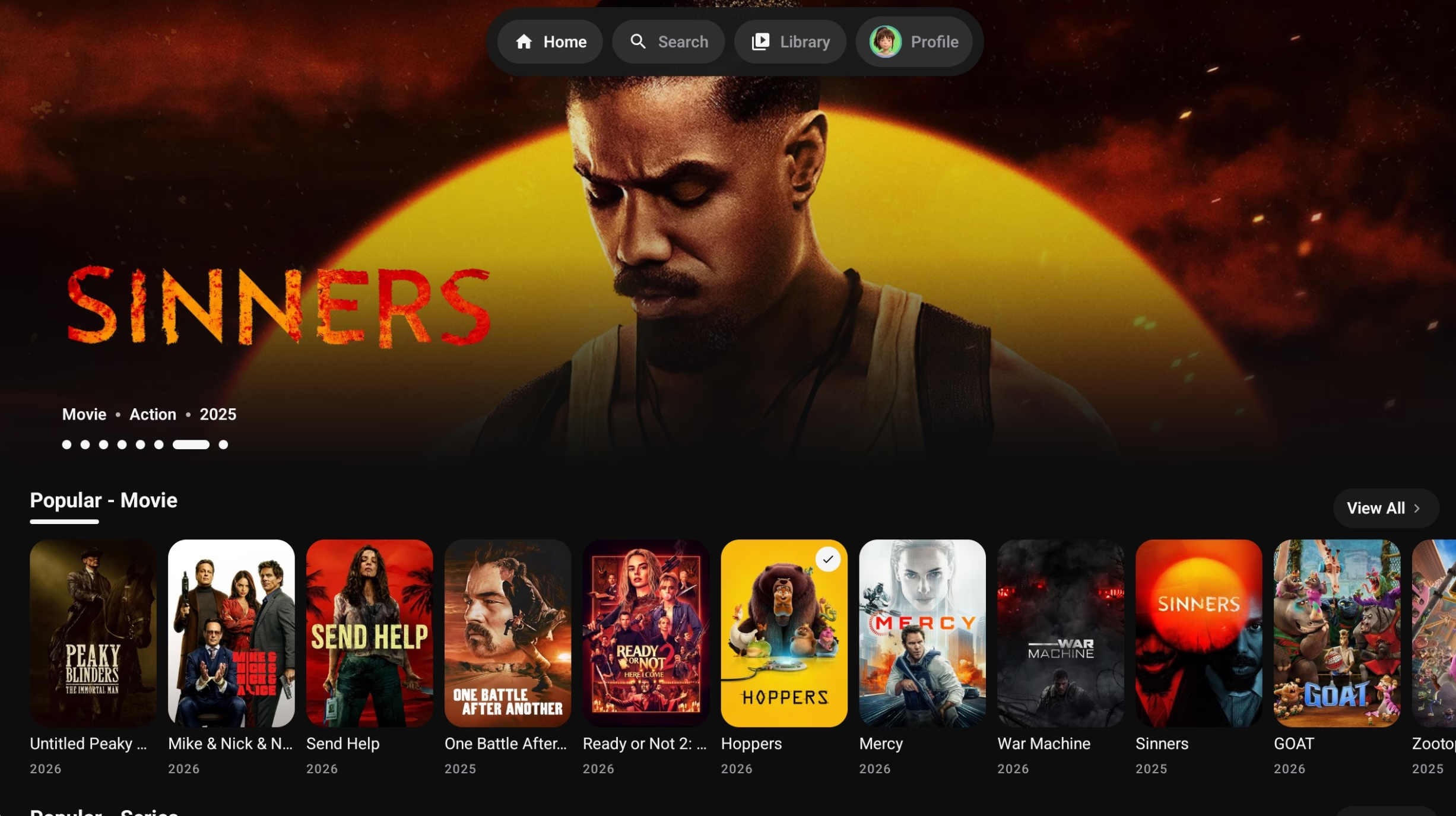
When Nuvio first appeared in the streaming community, it arrived with a deceptively confident posture for a beta application. Built as a content hub in the tradition of Stremio and Kodi, Nuvio differentiates itself through an uncommonly clean user experience and features that even its closest rivals haven’t yet managed to pull off convincingly, most notably, multi-user profile management.
What is Nuvio?
Nuvio is a streaming application available for Android phones, tablets, Android TV, Google TV, Fire TV, and Amazon Firestick. It does not host or distribute any content instead, it functions as a client-side interface that connects with user-installed plugins and Stremio-compatible addons, surfacing streams from whichever providers you choose to configure. Think of it as the shell around your content sources, not the source itself.
The application ships with a handful of official addons pre-installed, including Cinemeta for metadata and OpenSubtitles for subtitles. Users can expand this by pasting Stremio addon manifest URLs directly into the interface which means the sprawling Stremio addon ecosystem is immediately compatible with Nuvio out of the box.
The profile system is genuinely impressive. You can assign each profile its own set of enabled addons, so a profile curated for sport content doesn’t cross-pollinate with the one you set up for anime. Each profile can be protected with a PIN practical if you have children or simply prefer clean separation between family members’ viewing histories.
Navigation speed is reportedly one of Nuvio’s most noticeable advantages over competitors. Searches resolve quickly and the streams provided by its integrated addons, particularly when paired with providers like MediaFusion or Torrentio, return high-definition results with low latency. For a beta-era application, the overall stability has impressed early adopters enough to cement a loyal following ahead of a full stable release.
Installation
On Android phones and tablets, Nuvio can be downloaded as a standard APK from the project’s official GitHub releases. On TV devices, users install via the Downloader app, enter a toolbox code, scroll to Nuvio, and select the TV build. The TV version is optimized specifically for remote navigation, with larger UI elements, a lean-back browsing experience, and a home screen that organises content into clear rows by category. An iOS beta is also available through TestFlight, AltStore, and SideStore, though the slot count has at times been limited.
Strmr – Entertainment in One Place
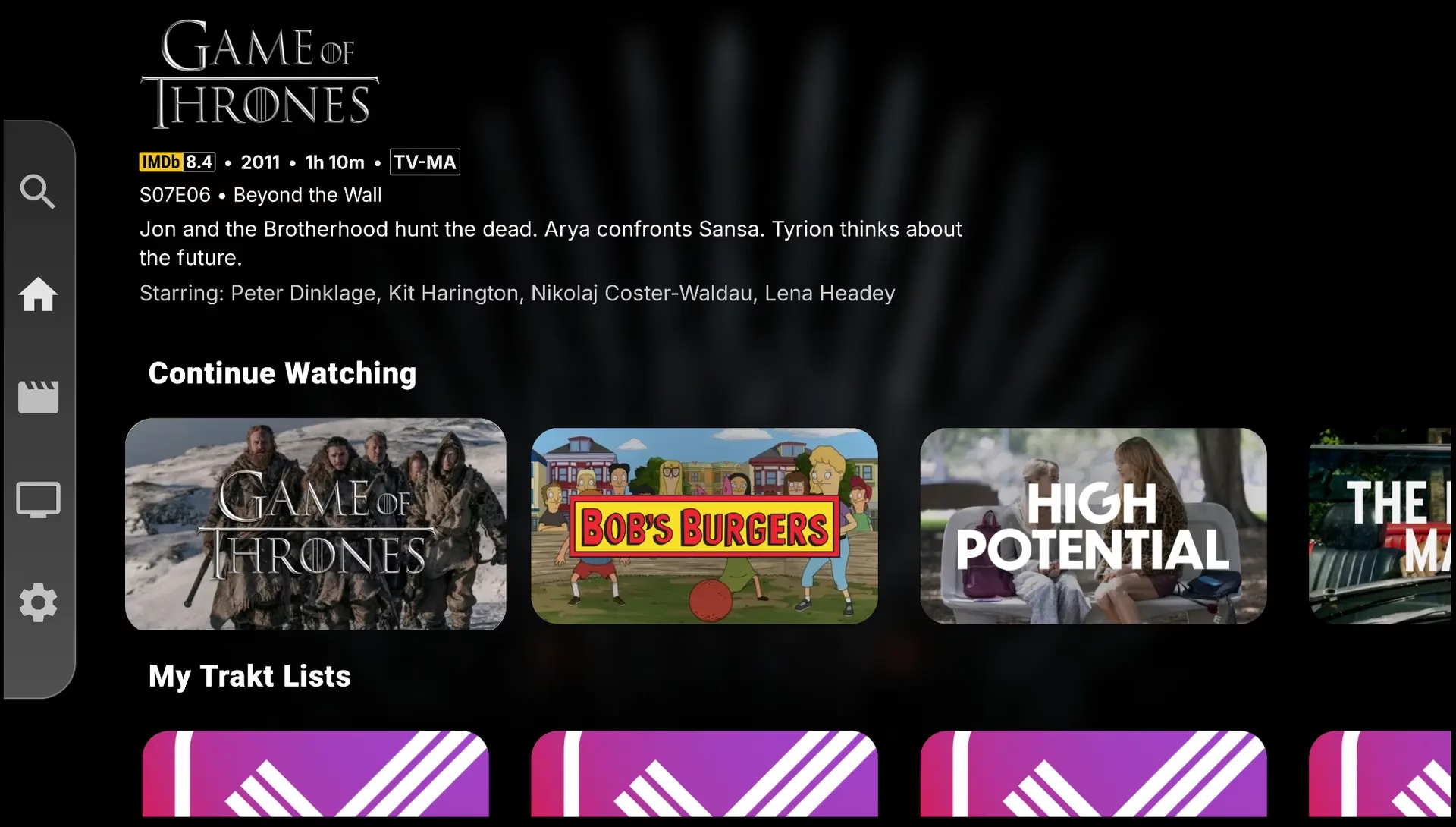
STRMR entered the scene with a cleaner premise than most of its peers: it is not primarily a streaming source aggregator, but a media tracking and discovery layer that knows where your content lives and gets you there without friction. That distinction sounds subtle on paper, but in daily use it fundamentally changes how you interact with your TV.
What it is
Available on Google Play as well as via sideloaded APK for Firestick and other Android TV devices, STRMR describes itself as a media aggregator for Android TV and mobile. It integrates with Trakt.tv for watch history and watchlist management, links directly to your streaming service apps so you can launch content without hunting through individual platforms, and connects to your personal debrid cloud library, all within a single, polished interface built from the ground up for D-pad remote navigation.
The distinction between STRMR and a raw streaming APK is worth noting. STRMR does not scrape or stream directly by default, instead, it acts as the intelligent front door to the services and files you already have access to. For users with a Real-Debrid, Premiumize, or AllDebrid account, STRMR becomes the unified console from which everything is browsed and launched. Stremio addon support is also available for users who want to extend its content reach further.
Standout features
- TV-first design
- Full D-pad navigation with large poster art & lean-back UX
- Debrid integration
- Premiumize, Real-Debrid & AllDebrid supported
- Trakt sync
- Full watchlist, collection & progress sync across devices
- Customisable home
- Reorder, show, or hide content rows to your preference
- Auto-play controls
- Configurable link autoselection & next-episode autoplay
- Quality filtering
- Enable/disable specific resolutions & adjust bitrate limits
The home screen customization in STRMR is more granular than most comparable apps. Users can not only show or hide content rows but drag them into any preferred order making it possible to build a home screen that opens directly to your continue-watching list, your sports watchlist, or your debrid library files, depending on what you most often reach for after sitting down in front of the TV.
The link-resolving engine deserves attention. By default, STRMR selects a stream automatically a convenience feature that works well in most situations. However, savvy users will want to disable auto-selection and manually review the available source list, particularly when working with debrid-resolved links, since manual selection allows filtering by quality and bitrate before playback begins. The Link Filtering settings let you set per-resolution toggles and cap bitrates to suit your connection.
The Google sign-in requirement
One friction point worth flagging: STRMR requires a Google account sign-in to access the application. This is not a dealbreaker, but users who are privacy-conscious or prefer not to link their primary Google account to a third-party streaming app may want to create a secondary anonymous account before getting started. This requirement did not exist in the earliest versions of the app and has divided opinion in the community somewhat but the active development team has signalled ongoing consideration of user feedback on the issue.
Verdict
STRMR stands out as the most visually impressive app in this roundup. When paired with a Trakt account and a debrid service, it arguably becomes the most essential TV tool you can ownturning your hardware into a smart, tailored content hub instead of a basic media navigator. While the mandatory Google login is a slight inconvenience, it is a small price to pay for the functionality it offers.
“The best cord-cutting tools don’t replace your subscriptions they put you back in charge of them.”On the new generation of Android TV media hubs
ARVIO occupies a different position in this comparison. Where Nuvio and STRMR are polished consumer products aimed squarely at mainstream cord-cutters, ARVIO is the power-user’s choice a free, open-source, ad-free media hub that connects to Jellyfin, Plex, Emby, IPTV playlists, Stremio addons, Trakt watchlists, and streaming service catalogs simultaneously, presenting everything through one unified, remote-first interface.
What it is
Released in February 2026 and already at version 1.9.92 as of this writing, ARVIO is built specifically for Android TV and Google TV, with a companion interface for Android phones and tablets. It is available on Google Play and as a sideloaded APK for Fire TV. It requires no media server of its own it connects as a client to whichever servers and services you already run or subscribe to.
The scope of what ARVIO unifies is genuinely impressive. Connect your Jellyfin server and its library appears as rows on the home screen alongside your Stremio addon content and your IPTV channels. Your Trakt watchlist integrates seamlessly. Your Plex library sits next to your live TV guide. ARVIO acts as the single entry point so you never need to switch apps based on where a piece of content happens to live.
Standout features
- Self-hosted servers
- Native Jellyfin, Plex & Emby integration as catalog sources
- Live TV / IPTV
- M3U playlist support with group navigation & mini-player
- Stremio addons
- Full addon ecosystem in a remote-first TV interface
- ARVIO Cloud sync
- QR sign-in syncs profiles, addons, catalogs & IPTV config
- Dolby Vision & Atmos
- Full passthrough on compatible Android TV hardware
- Completely free
- Open source · No ads · No analytics · No premium tier
ARVIO’s multi-profile system mirrors Nuvio’s in ambition but goes further in implementation. Each profile has its own watch history, watchlist, addons, and catalog preferences. The ARVIO Cloud sync system activated via QR code scan from a phone propagates all of this configuration across devices automatically, so setting up a second TV or a fresh install requires seconds rather than minutes of manual reconfiguration.
Playback is handled through ExoPlayer, which supports Dolby Vision and Atmos passthrough on compatible devices, including the NVIDIA Shield, Google TV Streamer, and Chromecast with Google TV. External player support is also available for users who prefer VLC or other third-party video players. Subtitles and multiple audio tracks are fully supported, with OpenSubtitles available as a built-in metadata provider.
The IPTV implementation deserves specific mention. Unlike many apps that bolt live TV on as an afterthought, ARVIO integrates M3U playlist management with group navigation and a mini-player that lets you monitor a live channel without fully leaving the content browsing interface. This is a genuinely useful quality-of-life feature for users who split their time between on-demand and live content.
The open-source advantage
Because ARVIO is fully open source with an active GitHub repository and Discord community, its development trajectory is unusually transparent. Users can file issues, track progress, and in some cases contribute directly. As of May 2026, the project sits at 74 GitHub stars with active recent commits focused on stability and new integrations. For users burned by closed-source apps that vanish without warning or explanation, ARVIO’s open nature is a meaningful assurance of longevity.
Verdict
ARVIO is the highest-rated app in this comparison for good reason. If you run any combination of Jellyfin, Plex, or Emby alongside an IPTV provider and Stremio addons, ARVIO is the closest thing to a perfect unified frontend that currently exists for Android TV. It is free, ad-free, open source, and extraordinarily capable. The only caveat: it rewards users who are willing to invest a few minutes in setup. The payoff is a media centre that feels completely bespoke.
Head-to-Head
How Nuvio, STRMR & ARVIO Compare
Each of these three apps serves a distinct user profile. The comparison below maps the key capabilities to help you identify which one or which combination belongs on your device.
| Feature | Nuvio | STRMR | ARVIO |
|---|---|---|---|
| Free to use | ✓ Free | ✓ Free | ✓ Free & open source |
| Android TV / Google TV | ✓ | ✓ | ✓ |
| Amazon Firestick | ✓ Sideload | ✓ Sideload | ✓ Sideload |
| Android phone / tablet | ✓ | ✓ | ✓ Companion UI |
| iOS support | ⚬ Beta / TestFlight | ✗ | ✗ |
| Stremio addon support | ✓ | ✓ | ✓ |
| Multi-user profiles | ✓ With PIN | ✗ | ✓ Per-account |
| Trakt.tv sync | ✓ | ✓ | ✓ |
| Debrid service support | ⚬ Via addons | ✓ Native (3 services) | ⚬ Via HTTP sources |
| Jellyfin / Plex / Emby | ✗ | ✗ | ✓ All three |
| Live TV / IPTV | ⚬ Via addons | ✗ | ✓ M3U native |
| Dolby Vision / Atmos | ⚬ Player-dependent | ⚬ Player-dependent | ✓ ExoPlayer passthrough |
| Ads | ✓ Ad-free | ✓ Ad-free | ✓ Ad-free |
| Open source | ✓ GitHub | ✓ GitHub | ✓ GPL-3.0 |
| Best for | Shared households | Debrid power users | Self-hosting enthusiasts |
The Recommendation
Which App Should You Install?
The honest answer for most users is that these apps are not mutually exclusive. Many power users will find themselves running two or even all three, switching between them depending on what they’re in the mood for. But if you’re starting fresh and want a single recommendation based on your situation, here is how to think about it.
Install Nuvio if…
You want the most frictionless getting-started experience and you share your TV with family members who have different taste. Nuvio’s profile system, clean interface, and Stremio addon compatibility make it the lowest-resistance path to a personalised streaming setup. It’s also the best choice if you want an experience that most closely resembles a premium subscription streaming service just without the subscription.
Install STRMR if…
You already have a Real-Debrid, Premiumize, or AllDebrid account and you want a beautiful, well-maintained TV app to serve as the front end for that library. STRMR’s design polish is genuinely best-in-class among this generation of streaming APKs, and its Trakt integration means your watch history is always in sync whether you’re watching on your TV, tablet, or phone. The Google sign-in requirement is the only meaningful hurdle create a secondary account if privacy is a concern.
Install ARVIO if…
You self-host a Jellyfin, Plex, or Emby server, or you want the most comprehensive single-app solution for combining on-demand content with live IPTV and Stremio addons. ARVIO’s open-source nature, zero-ad commitment, and extraordinary feature depth make it the most rewarding choice for users willing to invest a modest amount of time in configuration. Its 4.8 user rating is not accidental. It reflects genuine quality that compounds over time as you personalise it to your setup.
Getting started, practical tips for all three apps
- Use a VPN. When integrating third-party Stremio addons, your streaming activity is visible to your ISP by default. A reputable VPN encrypts this traffic and protects your privacy regardless of which app you use.
- Start with official addons. All three apps ship with or support official addons like Cinemeta and OpenSubtitles. These are safe, legal, and a good baseline before exploring third-party extensions.
- Pair with a debrid service for best stream quality. Services like TorBox or Real-Debrid dramatically improve stream reliability and quality compared to direct addon sources. STRMR supports this natively; Nuvio and ARVIO support it via compatible addons.
- Link your Trakt account. All three apps support Trakt.tv integration. Connecting it from day one means your watch history and progress are preserved even if you switch apps or devices.
- Install from official GitHub releases. For all three apps, the safest download source is the official GitHub repository linked from each project’s website. Avoid third-party APK aggregators.
A New Era for Android TV Streaming
What Nuvio, STRMR, and ARVIO collectively represent is more than a collection of good apps, they represent a maturation of the cord-cutting philosophy. The earliest generation of streaming APKs prioritised breadth of content over everything else, often at the expense of user experience, stability, and safety. This new generation has inverted that priority stack.
Each of these three applications is built around a clear design philosophy. Each respects the user enough to provide a polished, fast, reliable interface. Each is free of advertising. Each is available on GitHub. And each achieves its goals without hosting a single byte of video, they are infrastructure, not content, and in doing so they sidestep the legal and ethical complications that plagued earlier tools in this space.
The result is that cord-cutters in 2026 have access to media management tools that, in terms of raw usability, rival or surpass the official apps from major streaming services. If you have been looking for a reason to revisit your Android TV setup, or to set one up for the first time, these three applications are as good a reason as any.